
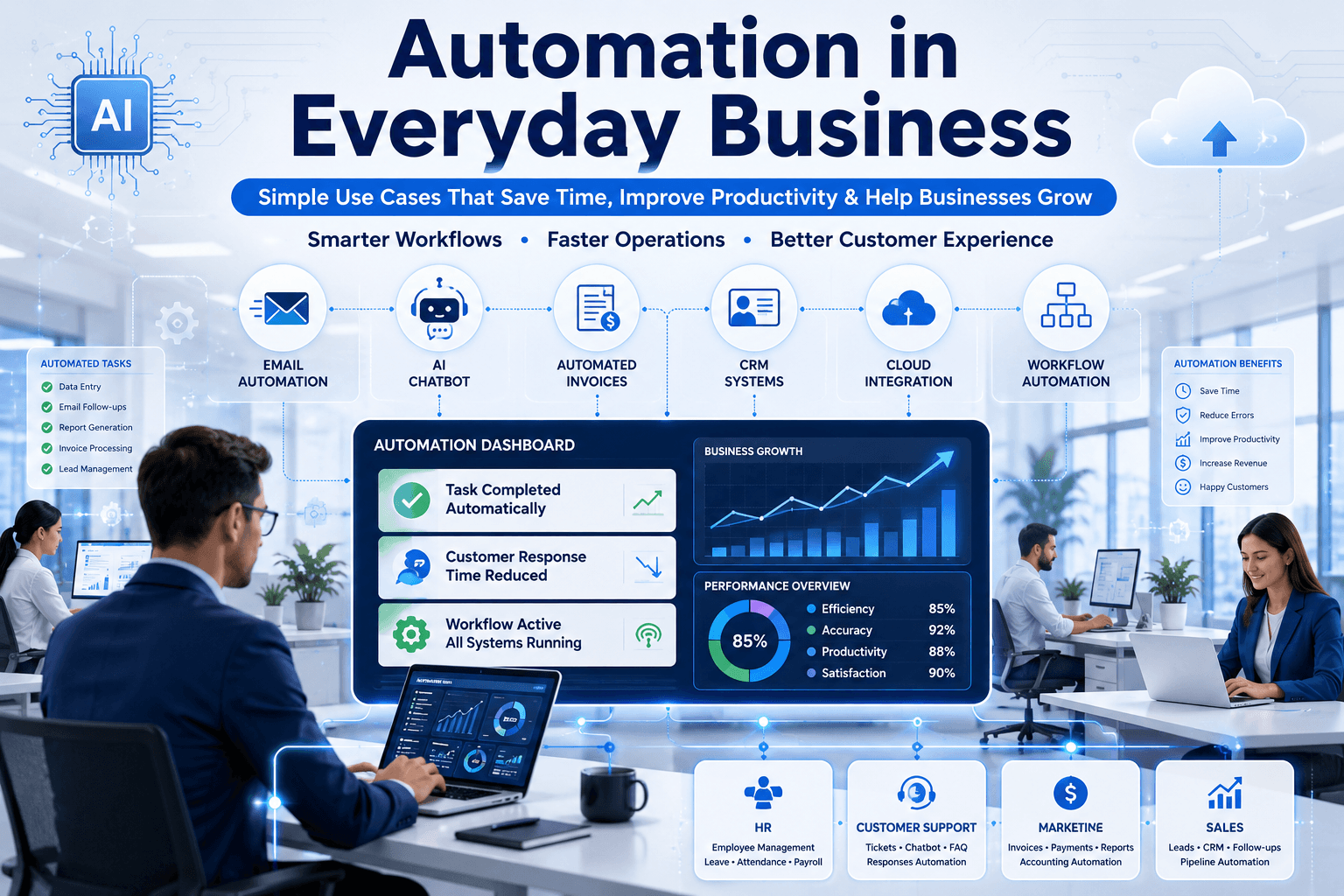
In today’s digital-first world, businesses are constantly searching for smarter ways to save time, reduce repetitive work, and improve efficiency. This is exactly where automation in everyday business becomes valuable. From customer support and marketing to invoicing and employee management, automation helps organizations streamline routine operations without requiring complex technical knowledge.
Whether you run a startup, an eCommerce store, a service-based company, or an enterprise-level organization, automation is no longer limited to large corporations. Modern businesses now use automation tools and custom software solutions to improve productivity, reduce manual errors, and create better customer experiences.
Many organizations are already investing in custom software development solutions to build automation systems tailored to their workflow and operational needs. As a result, businesses can focus more on growth and innovation rather than repetitive tasks.
In this blog, we will explore practical and easy-to-understand examples of automation in business, its benefits, real-world applications, and how companies can begin implementing automation step by step.
What Is Automation in Everyday Business?
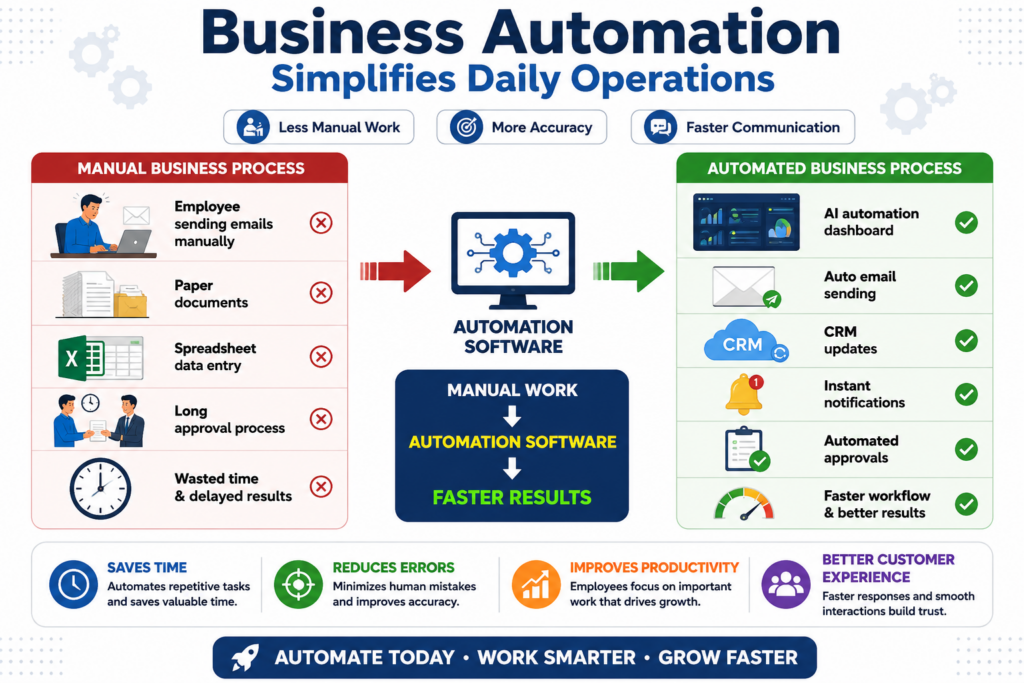
Automation in everyday business refers to the use of technology, software, or digital systems to perform repetitive tasks automatically with minimal human intervention.
Instead of manually handling repetitive work such as sending emails, updating spreadsheets, generating invoices, or tracking customer inquiries, automation software performs these actions faster and more accurately.
Business automation can be simple or advanced depending on the organization’s goals. For example:
- Automatically sending appointment reminders
- Creating invoices after successful payments
- Assigning support tickets to teams
- Updating inventory in real time
- Scheduling social media posts
- Generating reports automatically
Today, automation tools integrate with websites, mobile applications, CRM systems, cloud platforms, and internal software to simplify day-to-day business activities.
According to McKinsey & Company, automation technologies have the potential to significantly improve productivity and operational efficiency across industries.
Why Businesses Are Adopting Automation Faster Than Ever
Businesses now operate in highly competitive environments where speed, customer experience, and efficiency directly impact growth. Therefore, organizations are adopting automation to remain agile and scalable.
Reduced Manual Work
Employees often spend hours performing repetitive tasks. Automation eliminates unnecessary manual effort, allowing teams to focus on strategic work instead.
For example:
- HR teams can automate attendance tracking
- Marketing teams can automate email campaigns
- Sales teams can automate lead follow-ups
As a result, businesses save time while improving operational consistency.
Better Accuracy and Fewer Errors
Manual processes increase the risk of human mistakes, especially when handling large amounts of data. Automated systems reduce errors in calculations, reporting, invoicing, and customer communication.
This becomes particularly important in industries like finance, healthcare, logistics, and IT services.
Improved Customer Experience
Customers expect fast responses and seamless interactions. Automation helps businesses deliver:
- Instant confirmations
- Quick support replies
- Personalized recommendations
- Faster order processing
For instance, chatbots and automated ticket systems can improve customer support availability 24/7.
Scalability for Growing Businesses
As businesses grow, managing operations manually becomes difficult. Automation allows companies to scale processes without proportionally increasing operational costs.
Organizations looking to modernize workflows often combine automation with custom web application development services to create scalable digital systems aligned with business goals.
Common Automation Use Cases in Everyday Business
Let’s now explore some simple and practical automation examples that almost any business can understand and implement.
Email Automation for Customer Communication
Email automation is one of the most commonly used forms of business automation.
Instead of manually sending emails to every customer, automated systems trigger emails based on user actions.
Common Examples
Welcome Emails
When users sign up on a website, the system automatically sends a welcome email with onboarding instructions.
Order Confirmation Emails
eCommerce businesses automatically send purchase confirmations, shipping details, and invoices.
Follow-Up Emails
Sales teams automate follow-up messages for leads who showed interest but did not complete a purchase.
Subscription Renewal Reminders
SaaS companies use automated reminders before subscription expiration dates.
Platforms like HubSpot and Mailchimp have made email automation accessible even for small businesses.
Customer Support Automation
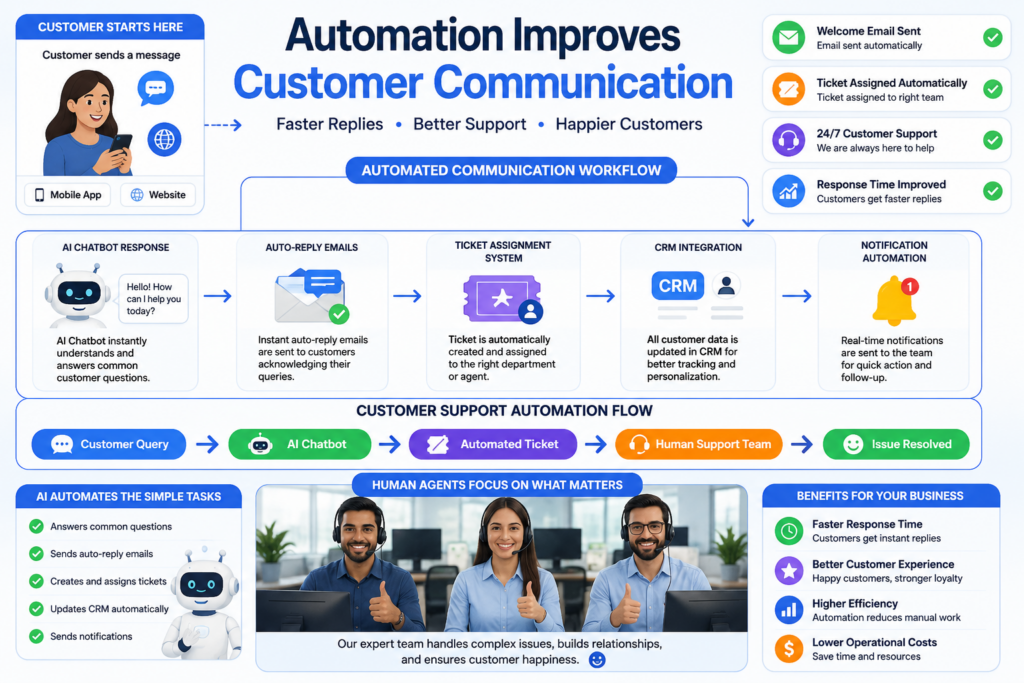
Customer support teams often manage repetitive questions daily. Automation can simplify support operations significantly.
Chatbots for Instant Responses
AI-powered chatbots can answer common customer questions instantly, such as:
- Pricing information
- Business hours
- Order status
- Service availability
This reduces support workload while improving response speed.
Ticket Routing Automation
Support tickets can automatically be assigned to the correct department based on issue type or priority level.
For example:
- Technical issues → IT team
- Billing inquiries → Finance team
- General questions → Customer support
Automated FAQs
Businesses can create self-service knowledge bases where users find answers without contacting support teams.
Many companies integrating automation into customer support also invest in business process automation solutions to improve workflow management across departments.
Social Media and Marketing Automation
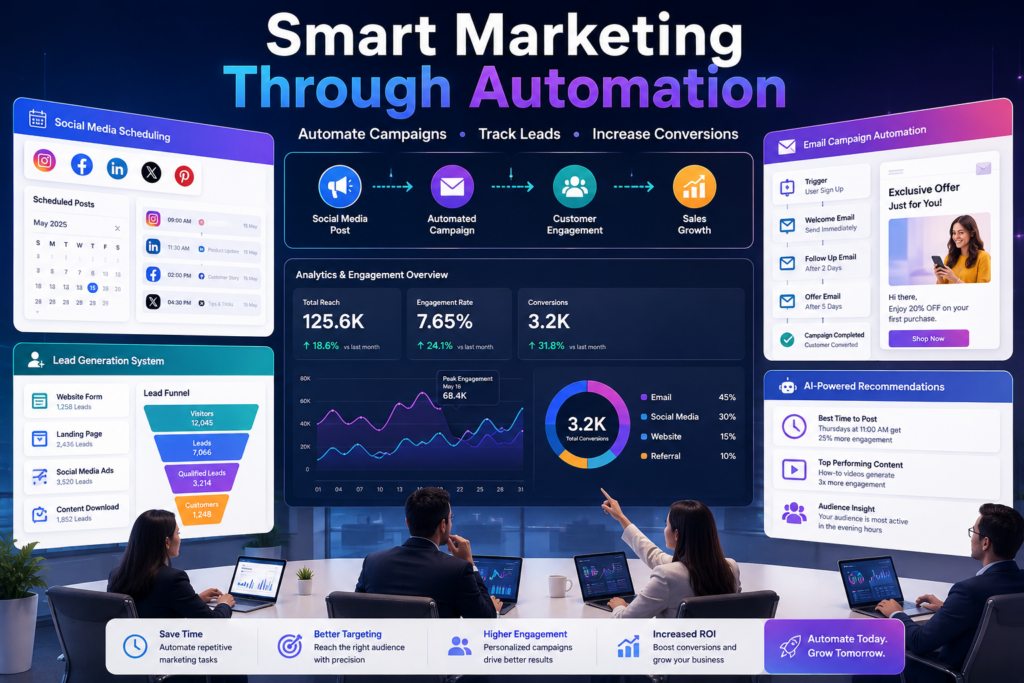
Digital marketing requires consistency and regular engagement. Automation helps marketing teams manage campaigns more efficiently.
Social Media Scheduling
Businesses can schedule posts in advance for platforms like:
- X (Twitter)
This ensures regular posting without manual daily effort.
Automated Lead Generation
Marketing automation systems can:
- Capture leads from forms
- Send automated responses
- Score leads based on engagement
- Notify sales teams instantly
Personalized Marketing Campaigns
Automation tools analyze customer behavior and send personalized recommendations or offers.
For example:
- Cart abandonment emails
- Product recommendations
- Personalized discounts
These strategies improve conversion rates and customer retention.
Invoice and Payment Automation
Financial operations often involve repetitive administrative work. Automation simplifies accounting and payment management.
Automatic Invoice Generation
Businesses can automatically generate invoices after:
- Service completion
- Subscription renewal
- Product purchase
Payment Reminders
Systems can send payment reminders before due dates, reducing delayed payments.
Expense Tracking
Accounting software automatically categorizes expenses and generates reports.
Automation in finance helps businesses maintain accurate records while reducing administrative overhead.
HR and Employee Management Automation
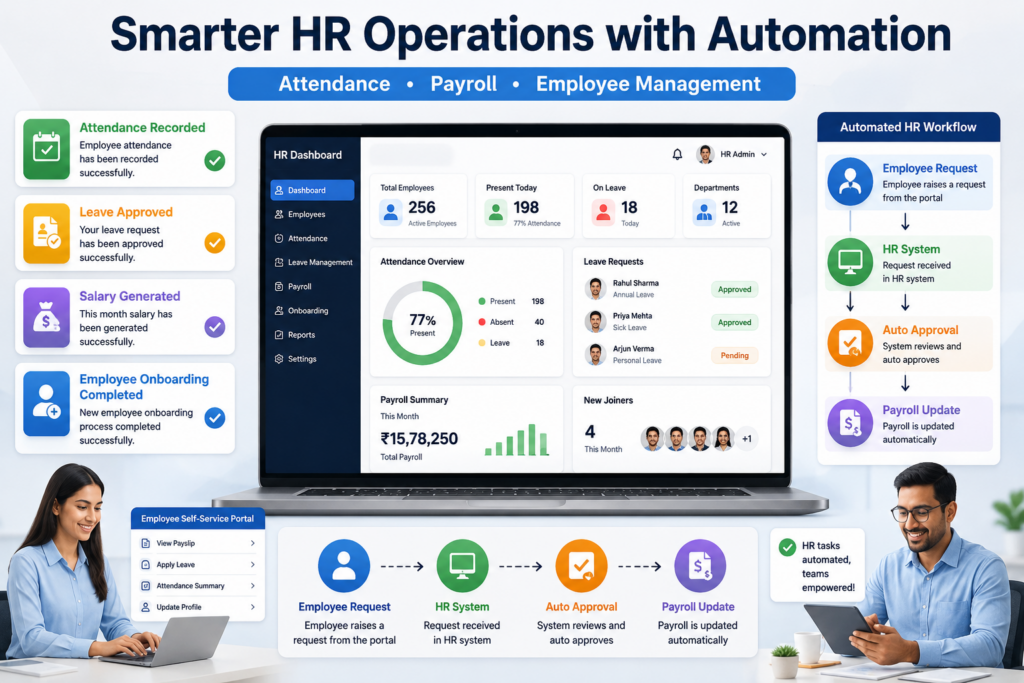
Human resource departments handle multiple repetitive tasks every day. Automation can improve employee management processes significantly.
Attendance and Leave Management
Employees can:
- Apply for leave online
- Track attendance automatically
- Receive leave approval notifications
Payroll Automation
Payroll systems automatically calculate:
- Salaries
- Tax deductions
- Overtime
- Bonuses
This reduces payroll errors and saves HR teams valuable time.
Employee Onboarding
New employee onboarding workflows can include:
- Automated document collection
- Welcome emails
- Training schedules
- Access permissions
Businesses implementing HR automation often experience smoother internal operations and improved employee experiences.
Inventory and Order Management Automation
Inventory management is critical for retail, manufacturing, and eCommerce businesses.
Automation helps organizations maintain accurate stock levels and streamline fulfillment processes.
Real-Time Inventory Updates
Systems automatically update inventory after every sale or return.
Low Stock Alerts
Businesses receive alerts when products reach minimum stock thresholds.
Automated Order Processing
Orders can automatically move through stages:
- Order received
- Payment verified
- Shipping initiated
- Delivery confirmed
This improves operational efficiency and customer satisfaction simultaneously.
Workflow Automation in Daily Operations
Workflow automation connects different departments and systems to create seamless business processes.
Examples of Workflow Automation
- Automatically approving requests
- Generating weekly reports
- Assigning tasks to teams
- Sending project status updates
- Updating CRM systems automatically
For example, if a customer submits a website inquiry form:
- CRM stores the lead
- Sales team receives notification
- Customer receives confirmation email
- Follow-up task is assigned automatically
This reduces delays and ensures smoother communication.
Organizations exploring advanced workflow optimization often benefit from reading resources on automation and digital transformation trends to understand how modern businesses scale operations efficiently.
Benefits of Automation in Everyday Business
Now that we understand practical use cases, let’s examine the major business advantages of automation.
Increased Productivity
Employees spend less time on repetitive tasks and more time on high-value activities.
Faster Business Operations
Automation accelerates processes such as approvals, reporting, communication, and transactions.
Cost Savings
Reducing manual work lowers operational costs over time.
Better Data Management
Automated systems maintain organized records and generate reports instantly.
Improved Collaboration
Departments communicate more efficiently through connected workflows.
Enhanced Customer Satisfaction
Faster responses and smoother service experiences improve customer trust and loyalty.
Challenges Businesses May Face During Automation
Although automation offers many benefits, businesses should also understand potential challenges.
Initial Setup Costs
Some automation systems require upfront investment in software or custom development.
However, long-term efficiency improvements often justify the investment.
Employee Adaptation
Teams may initially resist process changes. Proper training and communication are important during implementation.
Integration Issues
Businesses using outdated systems may face integration challenges with modern automation platforms.
Over-Automation Risks
Not every process should be fully automated. Human interaction remains essential in areas like relationship management and strategic decision-making.
Therefore, businesses should focus on balancing automation with human expertise.
How Small Businesses Can Start With Automation
Many small businesses assume automation is expensive or overly technical. In reality, businesses can start small and scale gradually.
Identify Repetitive Tasks
First, identify tasks performed repeatedly every day.
Examples include:
- Sending invoices
- Scheduling meetings
- Responding to common questions
- Managing leads
Choose the Right Tools
Businesses should select tools based on:
- Budget
- Workflow complexity
- Scalability
- Integration support
Start With One Process
Instead of automating everything immediately, begin with a single workflow.
For example:
- Email automation
- Customer inquiry handling
- Appointment scheduling
Measure Performance
Track improvements in:
- Time savings
- Error reduction
- Customer response times
- Employee productivity
This helps businesses understand automation ROI effectively.
The Future of Automation in Business
Automation continues evolving rapidly with technologies such as:
- Artificial Intelligence (AI)
- Machine Learning (ML)
- Robotic Process Automation (RPA)
- Cloud Computing
- Predictive Analytics
Businesses are moving toward intelligent automation systems capable of learning from user behavior and making real-time decisions.
According to IBM’s automation insights, modern automation is becoming essential for improving efficiency, agility, and business resilience.
In the coming years, even small businesses will increasingly adopt automation to remain competitive in digital markets.
Conclusion
Automation in everyday business is no longer a futuristic concept reserved for large enterprises. Today, businesses of all sizes can automate repetitive tasks, improve efficiency, reduce operational costs, and deliver better customer experiences.
From email automation and customer support to inventory management and HR workflows, practical automation use cases are now easier to implement than ever before.
Most importantly, automation allows businesses to focus more on innovation, customer relationships, and long-term growth instead of spending valuable time on repetitive administrative tasks.
Organizations planning to modernize their operations often benefit from scalable digital solutions, custom applications, and workflow automation strategies designed specifically for their business model. With the right implementation approach, automation becomes a powerful tool for sustainable growth and operational excellence.
Tags
Share this article
About the Author
Experienced IT professional specializing in enterprise solutions and modern technology implementations.
Related Articles
Stay Updated
Get the latest IT insights delivered to your inbox.