
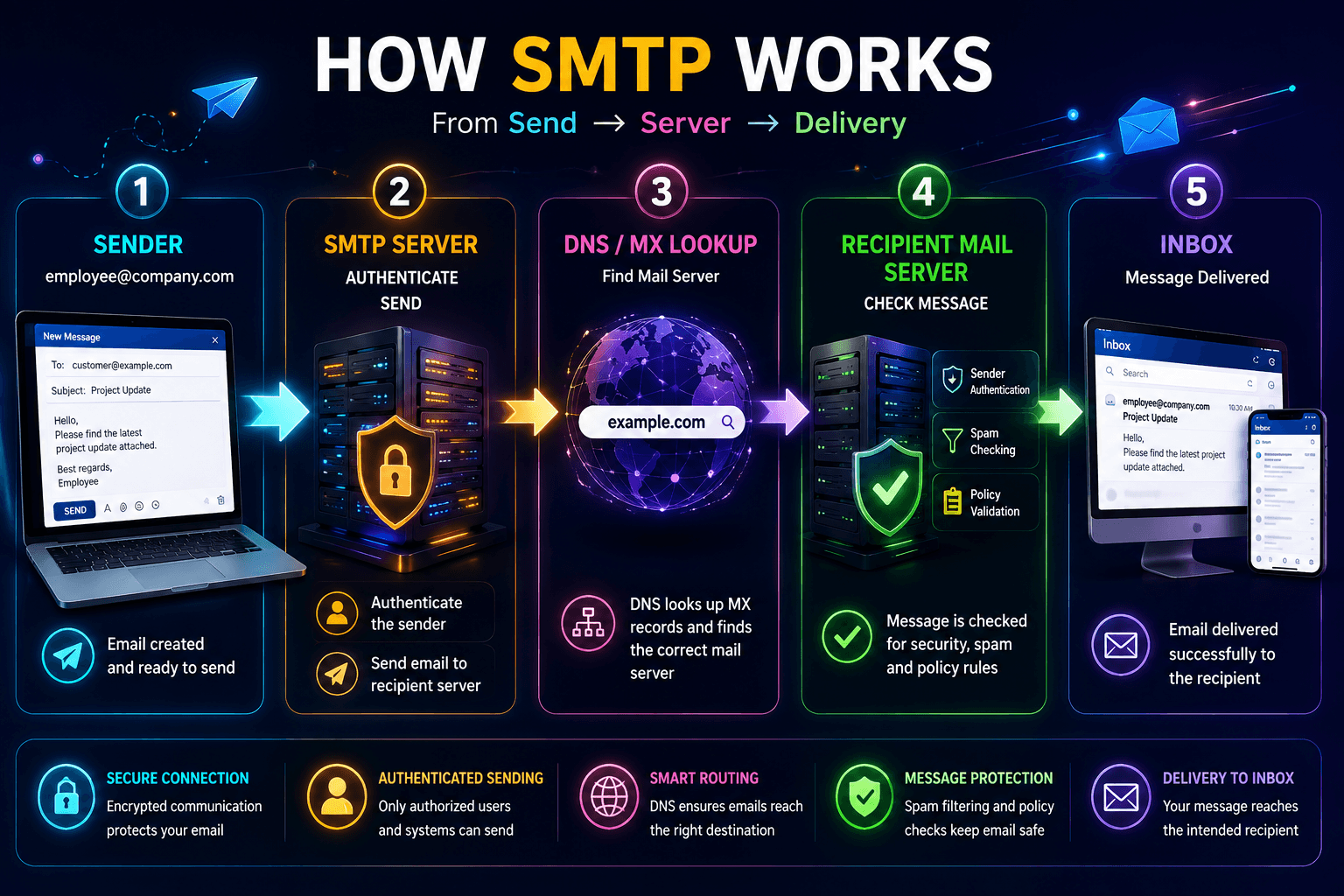
SMTP (Simple Mail Transfer Protocol) is the technology that helps businesses send email from an email client or application to a recipient’s mail server. Whether a company sends a sales proposal, customer notification, invoice, password reset, or everyday business email, SMTP is usually part of the journey.
Sending an email looks simple: write a message, enter an address, and click Send. Behind the scenes, however, several systems work together. They verify the sender, find the recipient’s mail server, transfer the message, and help deliver it to the right mailbox.
For businesses, understanding how SMTP works is important because email is more than a communication channel. It is part of a company’s technical infrastructure. Poor configuration can cause delivery failures, authentication problems, spam placement, or unreliable application emails.
This guide explains SMTP for business email, how SMTP servers work, what happens after you click Send, which ports and security protocols are involved, and how businesses can build a more reliable email-sending setup.
What Is SMTP?
SMTP stands for Simple Mail Transfer Protocol. It is a standard protocol used to send email messages between mail systems.
SMTP mainly handles outgoing email and message transfer. However, it is only one part of a complete email system.
A business email system usually uses several protocols, and each one has a different job:
- SMTP — sends outgoing email.
- IMAP — allows email clients to access and synchronize messages stored on a mail server.
- POP3 — retrieves messages from a mail server, traditionally by downloading them to a client.
- DNS — helps identify which mail server is responsible for receiving email for a domain.
- TLS — encrypts communication between systems when configured and supported.
For example, imagine a company employee sends an email from [email protected] to [email protected].
The basic process looks like this:
Email Client → SMTP Server → Recipient Mail Server → Recipient Inbox
The SMTP server does not simply “send the email to the inbox.” It first has to determine where the recipient’s email should go and establish communication with the appropriate mail server.
How SMTP Works: The Email Journey
The easiest way to understand SMTP is to follow an email from the moment the sender clicks Send.
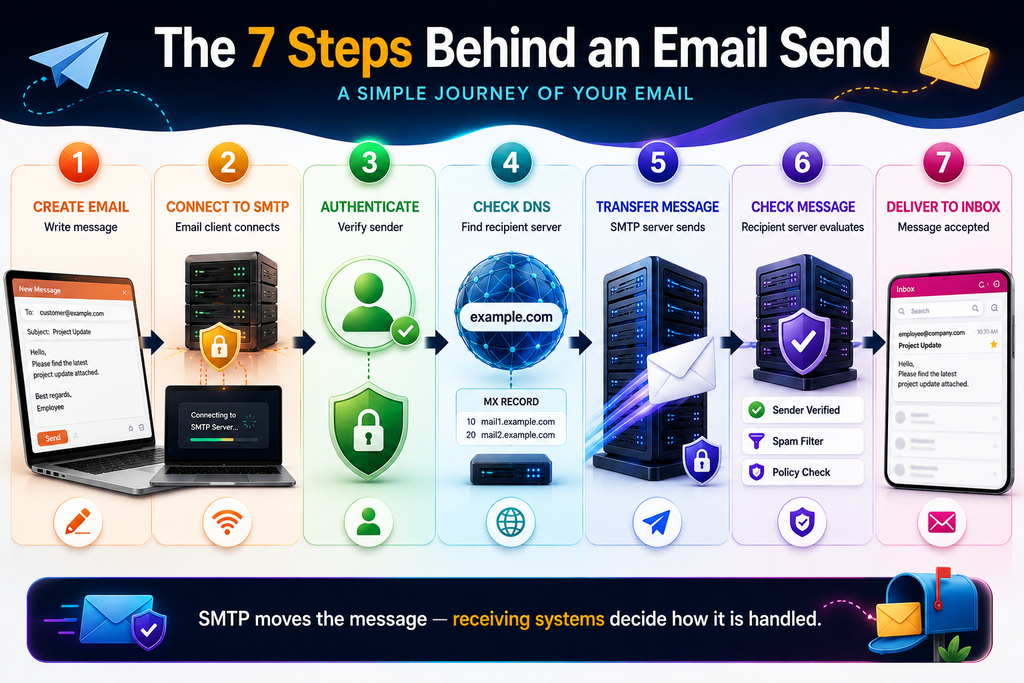
1. The sender creates an email
The process begins in an email client, webmail interface, mobile application, or business application.
The message typically contains:
- Sender address
- Recipient address
- Subject
- Message body
- Attachments
- Email headers
For a business application, the message might be generated automatically by the application itself. For example, an e-commerce website could generate an order confirmation after a customer completes a purchase.
2. The email client connects to an SMTP server
After the sender clicks Send, the email client needs an SMTP server capable of accepting outgoing messages.
The client connects to the SMTP server using a configured hostname and port.
For example:
mail.company.com
The exact hostname depends on the organization’s email infrastructure.
At this point, the server may ask for authentication. This step confirms that the sender has permission to use the SMTP service.
3. The sender is authenticated
Business email systems generally do not allow an unknown user to freely send messages through their SMTP server.
The client may authenticate using credentials or another supported authentication mechanism.
Authentication helps the server determine:
“Is this user authorized to send email through this server?”
This is particularly important because an improperly configured SMTP server can potentially become an open relay, allowing unauthorized parties to send messages through it.
For businesses, SMTP authentication should therefore be treated as an important part of email infrastructure management.
4. The SMTP server checks the recipient domain
Suppose the sender is:
and the recipient is:
The SMTP system needs to determine which mail server handles email for example.com.
This is where DNS becomes important.
The sending mail system looks up the recipient domain’s MX (Mail Exchange) records.
An MX record tells other mail systems which servers are responsible for receiving email for a domain.
Conceptually:
example.com → MX record → recipient mail server
Next, the sending server connects to the recipient’s mail server.
5. SMTP servers communicate
The sending SMTP server establishes a connection with the recipient’s mail server.
The two systems communicate using SMTP commands and responses.
A simplified conversation might look like:
EHLO mail.company.com
MAIL FROM:<[email protected]>
RCPT TO:<[email protected]>
DATA
Subject: Project Update

Hello,
Here is the latest project update.
.
QUIT
These commands are part of the SMTP protocol.
The actual communication contains considerably more information, including headers, authentication-related information, message formatting, and other technical details.
6. The recipient server accepts or rejects the message
Once the message arrives, the destination server checks it.
It may check factors such as:
- Whether the recipient exists
- Sender authentication
- Domain reputation
- IP reputation
- Message characteristics
- Spam indicators
- Email policies
- Attachment restrictions
- Rate limits
The recipient server can accept the message, temporarily defer it, or reject it.
This is one reason why SMTP delivery is not the same thing as inbox placement.
A message can successfully reach the recipient’s mail infrastructure but still be filtered into spam or another folder.
7. The message reaches the recipient’s mailbox
If the destination system accepts the message, it stores the email in the appropriate mailbox.
The recipient then accesses the message using webmail, an email client, or another supported interface.
At this point, the SMTP transfer has largely completed its job.
SMTP for Business Email: Why It Matters
Business email supports many important processes.
Employees use email to communicate with:
- Customers
- Vendors
- Partners
- Employees
- Prospects
- Service providers
Applications may also send:
- Account verification emails
- Password reset messages
- Order confirmations
- Payment notifications
- Appointment reminders
- System alerts
- Reports
- Contact-form notifications
As a result, an SMTP problem can quickly become a business problem.
- If a website’s contact form cannot send messages, a sales inquiry might never reach the team. If a password-reset email fails, users may be unable to access their accounts. If transactional emails are consistently filtered, customers may lose confidence in the application.
This is why email infrastructure deserves the same technical attention given to websites, APIs, databases, and other business systems.
Technobot System works across business technology and software development, where dependable communication between applications and services is often an important part of a broader technical architecture. You can learn more about the company and its technology work on the Technobot System About page.
SMTP Ports Explained
One common question is: Which SMTP port should a business use?
The answer depends on the type of SMTP connection being established.
Port 25
Port 25 is mainly associated with SMTP communication between mail servers.
Mail servers may use it to transfer email between one another.
However, many networks restrict outbound connections on port 25 to reduce spam and abuse.
- Port 25 is therefore generally not the first choice for an email application that needs to authenticate to an SMTP submission server.
Port 587
- Port 587 is commonly used when an authenticated email client or application submits outgoing messages.
It is often the appropriate choice when an application or email client needs to submit outgoing messages to an SMTP server.
A typical setup might look like:
SMTP Host: smtp.company.com
Port: 587
Security: STARTTLS/TLS
Authentication: Required
The exact settings depend on the email provider or server configuration.
Port 465
Port 465 is commonly associated with SMTP over TLS.
It is also used by many modern email services for secure SMTP connections.
The important distinction is how encryption is established during the connection. Administrators should follow the configuration requirements of their specific mail server rather than choosing a port based solely on convention.
SMTP Authentication and Security
Without proper authentication, email systems can face security and delivery problems.
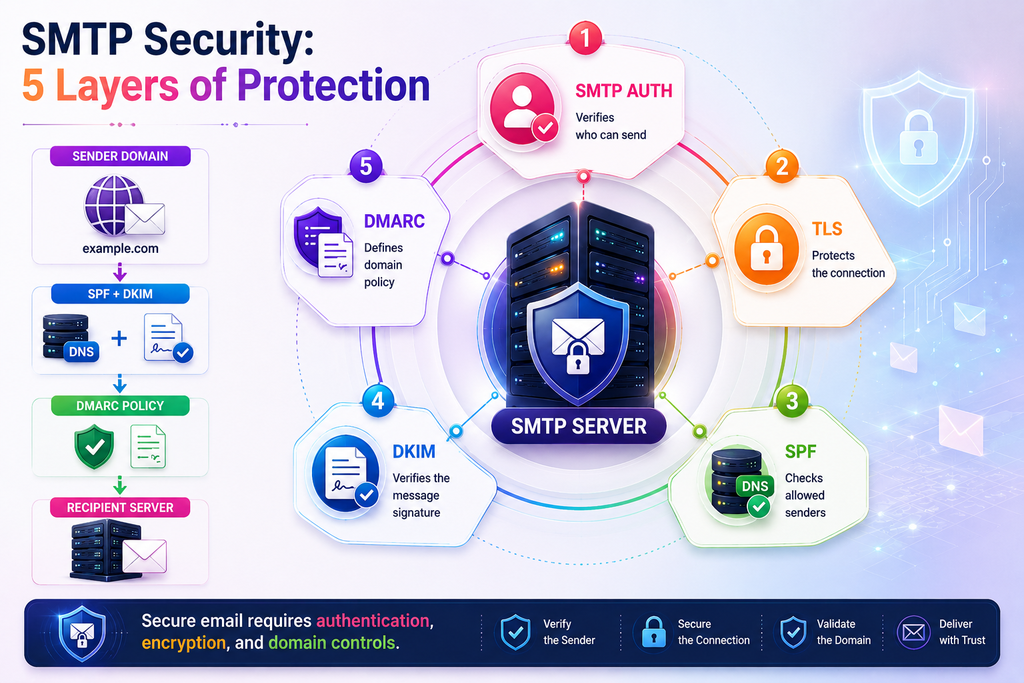
A secure business SMTP setup should include several important controls:
SMTP Authentication
SMTP authentication verifies that the connecting user or application has permission to submit email.
Without appropriate access controls, an SMTP server could potentially be abused to send unauthorized messages.
TLS Encryption
TLS can protect the communication channel between the email client and SMTP server, depending on the configuration.
This is especially important when authentication credentials are being transmitted.
SPF
Sender Policy Framework (SPF) lets a domain publish which mail servers are allowed to send email for that domain.
For example, a domain can publish an SPF policy identifying permitted sending infrastructure.
SPF does not encrypt email. Instead, it helps receiving systems evaluate whether a sending server is authorized for the domain.
DKIM
DomainKeys Identified Mail (DKIM) adds a cryptographic signature to outgoing email.
The receiving server can then use the domain’s public key to check the signature. This helps verify the sender and detect changes to signed parts of the message.
DMARC
Domain-based Message Authentication, Reporting, and Conformance (DMARC) builds on SPF and DKIM and allows a domain owner to publish a policy describing how receiving systems should handle messages that fail authentication checks.
Businesses should consider SPF, DKIM, and DMARC together rather than treating them as unrelated settings.
For broader application-security considerations, Technobot System has also covered the vital role of cybersecurity in web application development.
SMTP vs. IMAP: What Is the Difference?
SMTP and IMAP are sometimes confused because both are associated with email.
Their roles are different.
| Protocol | Primary Purpose |
|---|---|
| SMTP | Sending email |
| IMAP | Accessing and synchronizing stored email |
| POP3 | Retrieving/downloading email |
| DNS | Finding services such as mail servers |
| TLS | Securing network communication |
Think of it this way:
SMTP moves outgoing messages.
IMAP helps your email application access messages stored in the mailbox.
This difference becomes especially useful when you are troubleshooting email problems.
For example, if you can receive email but cannot send it, SMTP configuration is one of the first areas to investigate.
If you can send email but cannot see previously received messages across multiple devices, the issue may instead involve mailbox access or IMAP configuration.
How Websites and Applications Use SMTP
SMTP is also used by websites and software applications.
Modern websites and applications frequently rely on SMTP for transactional communication.
Consider a software application with a user registration system.
After a user creates an account, the application may need to send:
- Registration confirmation
- Email verification link
- Welcome message
- Password reset instructions
- Security notification
After generating the message, the application sends it to an SMTP service.
A simplified architecture might look like:
User
  ↓
Web Application
  ↓
Application Email Service
  ↓
SMTP Server
  ↓
Recipient Mail Server
  ↓
User Inbox
This makes SMTP an important component of many web applications.
When building custom software or improving an existing application, developers should consider email delivery as part of the overall application architecture rather than adding it as an afterthought.
SMTP and Bulk Business Email
Businesses sending a large volume of legitimate email need to think beyond simply having an SMTP username and password.
However, sending larger volumes of legitimate business email requires extra planning:
- Sending reputation
- Authentication
- Bounce handling
- Rate management
- Complaint rates
- Domain configuration
- IP reputation
- Monitoring
- Delivery failures
- Suppression management
For organizations managing business email infrastructure, BulkMX can be relevant when evaluating dedicated email-hosting and mail-management requirements:
The underlying principle remains the same: reliable email delivery depends on correctly configured infrastructure, authentication, responsible sending practices, and continuous monitoring.
Why SMTP Emails Fail
Even with a correct SMTP setup, some messages may still fail.
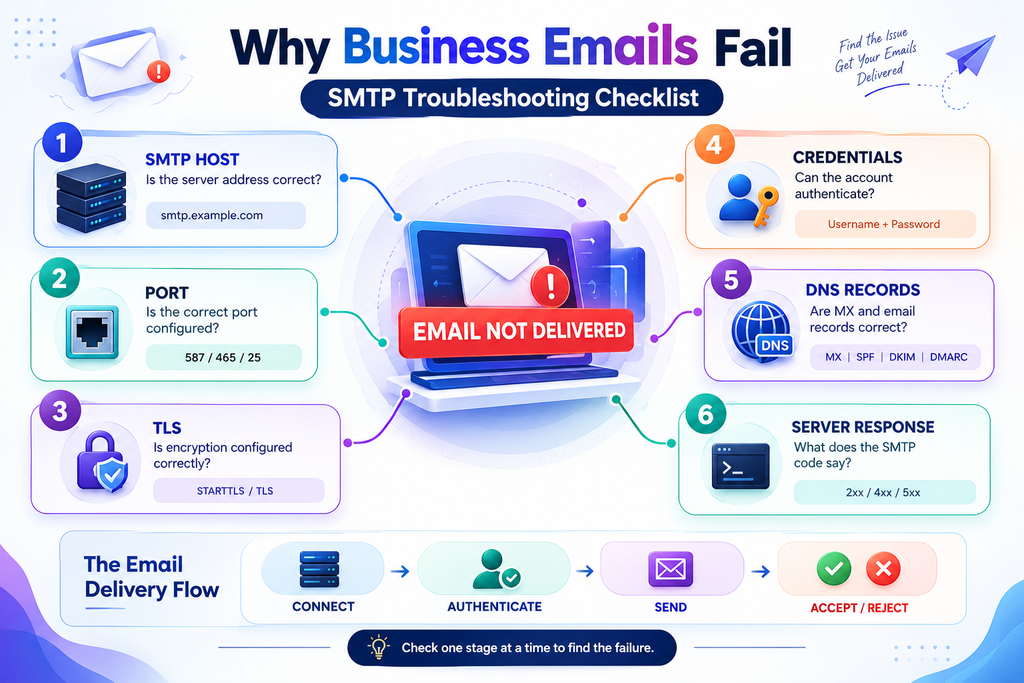
Common causes include:
Incorrect SMTP credentials
If the username or password is incorrect, the server may reject the authentication attempt.
Wrong SMTP hostname
A typo in the SMTP server hostname can prevent the application from establishing a connection.
Incorrect port or encryption setting
Using the wrong combination of port and TLS/SSL configuration can cause connection errors.
DNS problems
Incorrect or missing DNS records can affect domain-based email delivery.
Recipient address problems
If the recipient mailbox does not exist, the destination server may reject the message.
Authentication failures
Problems with SPF, DKIM, or DMARC alignment can affect how receiving systems evaluate messages.
Reputation problems
A domain, IP address, or sending infrastructure with a poor reputation may experience increased filtering or rejection.
Rate limits
Some providers also limit how many messages an account can send during a set period.
Network restrictions
Some hosting providers, corporate networks, or cloud environments may restrict outbound SMTP traffic, particularly on port 25.
SMTP Troubleshooting Checklist
When business email stops working, do not change several settings at once.
Work through the system methodically.
Step 1: Check the SMTP hostname
Confirm that the application is connecting to the correct SMTP server.
Step 2: Verify the port
Check whether the provider requires port 587, 465, or another configured port.
Step 3: Check encryption
Confirm whether the server expects STARTTLS, implicit TLS, or another supported security configuration.
Step 4: Verify authentication
Confirm the SMTP username and credentials.
Step 5: Check DNS
Review the domain’s relevant DNS records, including MX and email-authentication records.
Step 6: Review server logs
Application and mail-server logs can reveal whether the failure happened during:
- Connection
- Authentication
- Message submission
- Recipient delivery
Step 7: Check the recipient response
SMTP servers typically provide response codes that can help identify why a message was accepted, delayed, or rejected.
Step 8: Test with a controlled message
Send a test email to a mailbox you control and examine the headers and delivery behavior.
This method is more effective because it shows exactly where the failure occurs.
SMTP Response Codes: What They Mean
SMTP servers use response codes to report what happened during a connection or message transfer.
Some commonly encountered categories include:
- 2xx — successful operation
- 3xx — additional information or action required
- 4xx — temporary failure; retry may succeed
- 5xx — permanent failure
For example, a temporary recipient-server problem may result in a 4xx response. A nonexistent recipient or other permanent condition may produce a 5xx response.
The exact three-digit code and accompanying message are important when diagnosing delivery problems.
For developers, logging the SMTP response rather than recording only “email failed” can make troubleshooting significantly easier.
SMTP and Email Deliverability Are Not the Same Thing
A common misconception about business email is:
“If SMTP accepted the message, it must have reached the inbox.”
Not necessarily.
SMTP transfers the message between mail systems. However, the receiving server can still check the message for spam, reputation, and authentication issues.
An email may be:
- Delivered to the inbox
- Delivered to spam
- Temporarily deferred
- Rejected
- Quarantined
- Accepted but filtered later
That is why successful SMTP authentication does not automatically guarantee strong email deliverability.
Businesses should monitor the entire email lifecycle, not just whether the SMTP connection works.
Best Practices for Business SMTP Setup
A reliable business email system should follow a few practical rules.
Use authenticated SMTP submission
Do not expose an unrestricted mail relay.
Prefer secure connections
Use the encryption method supported by your SMTP provider or mail server.
Configure SPF, DKIM, and DMARC
These authentication mechanisms help receiving systems evaluate messages sent using your domain.
Keep DNS records accurate
Incorrect DNS configuration can create avoidable delivery problems.
Monitor bounce and rejection rates
Repeated failures can reveal configuration or recipient-quality problems.
Separate transactional and marketing email where appropriate
Different email categories may have different operational requirements.
Protect SMTP credentials
Never hard-code credentials into publicly accessible frontend code or expose them in client-side applications.
Log failures
Record meaningful SMTP errors so developers and administrators can diagnose issues quickly.
Monitor sending behavior
Unexpected spikes in outgoing email can indicate application bugs, compromised credentials, or abuse.
Test before production deployment
When an application depends on email, test registration, password reset, notifications, and other critical flows before releasing the application.
The Role of SMTP in Modern Business Technology
SMTP may be an old protocol, but it remains a fundamental part of business communication.
What has changed is the environment around it.
Today, email often connects:
- Websites
- SaaS platforms
- Mobile applications
- CRM systems
- Payment systems
- Customer portals
- Internal business applications
- Monitoring platforms
- Cloud infrastructure
A single application can trigger thousands of emails through its infrastructure.
That makes email architecture an important part of reliable software development.
- A well-designed application should know what happens when an email cannot be delivered. Should the user see an error? Should the application retry? Should the system queue the message? Should administrators receive an alert?
These are software architecture questions as much as they are email questions.
For businesses developing or improving web applications, email should therefore be considered alongside performance, APIs, databases, authentication, user experience, and operational monitoring.
Frequently Asked Questions About SMTP
What is SMTP used for?
SMTP is used primarily to send and transfer email messages between mail systems. It is commonly used by email clients, websites, applications, and mail servers to submit and deliver outgoing email.
What is an SMTP server?
An SMTP server is a mail server that accepts outgoing email from authorized clients or systems and transfers messages toward their intended recipient mail servers.
Is SMTP used for receiving email?
SMTP is primarily a sending and transfer protocol. Receiving and accessing messages from a mailbox typically involves other components and protocols, such as IMAP or POP3.
Which SMTP port should businesses use?
Port 587 is commonly used for authenticated email submission, while port 465 is commonly associated with SMTP over TLS. Port 25 is traditionally used for server-to-server SMTP traffic but may be restricted by networks or providers.
Does SMTP guarantee inbox delivery?
No. SMTP acceptance does not guarantee that a message will appear in the recipient’s inbox. Receiving systems can filter, quarantine, defer, or reject messages based on various factors.
Why do businesses need SPF, DKIM, and DMARC?
These mechanisms help receiving systems authenticate and evaluate email sent using a domain. Proper configuration can improve the trustworthiness and handling of legitimate business email.
Conclusion
SMTP for business email is the behind-the-scenes system that makes outgoing email possible. From the moment an employee or application clicks Send, the message passes through authentication, DNS lookups, SMTP communication, recipient-server checks, and mailbox processing before it becomes visible to the recipient.
Understanding how SMTP works helps businesses find email problems, design better applications, protect their mail systems, and keep communication reliable.
The most important areas to get right are straightforward: use authenticated SMTP, configure secure connections, maintain accurate DNS records, implement SPF/DKIM/DMARC, protect SMTP credentials, monitor delivery failures, and design applications to handle email errors properly.
Email infrastructure may not be visible to customers, but when it fails, customers notice immediately. Treating SMTP as an essential part of the overall technology stack can help businesses build more reliable websites, applications, and digital services.
For organizations looking at broader software and technology improvements, Technobot System provides a useful starting point for exploring its technology-focused work and solutions.
Tags
Share this article
About the Author
Experienced IT professional specializing in enterprise solutions and modern technology implementations.
Related Articles


Stay Updated
Get the latest IT insights delivered to your inbox.