
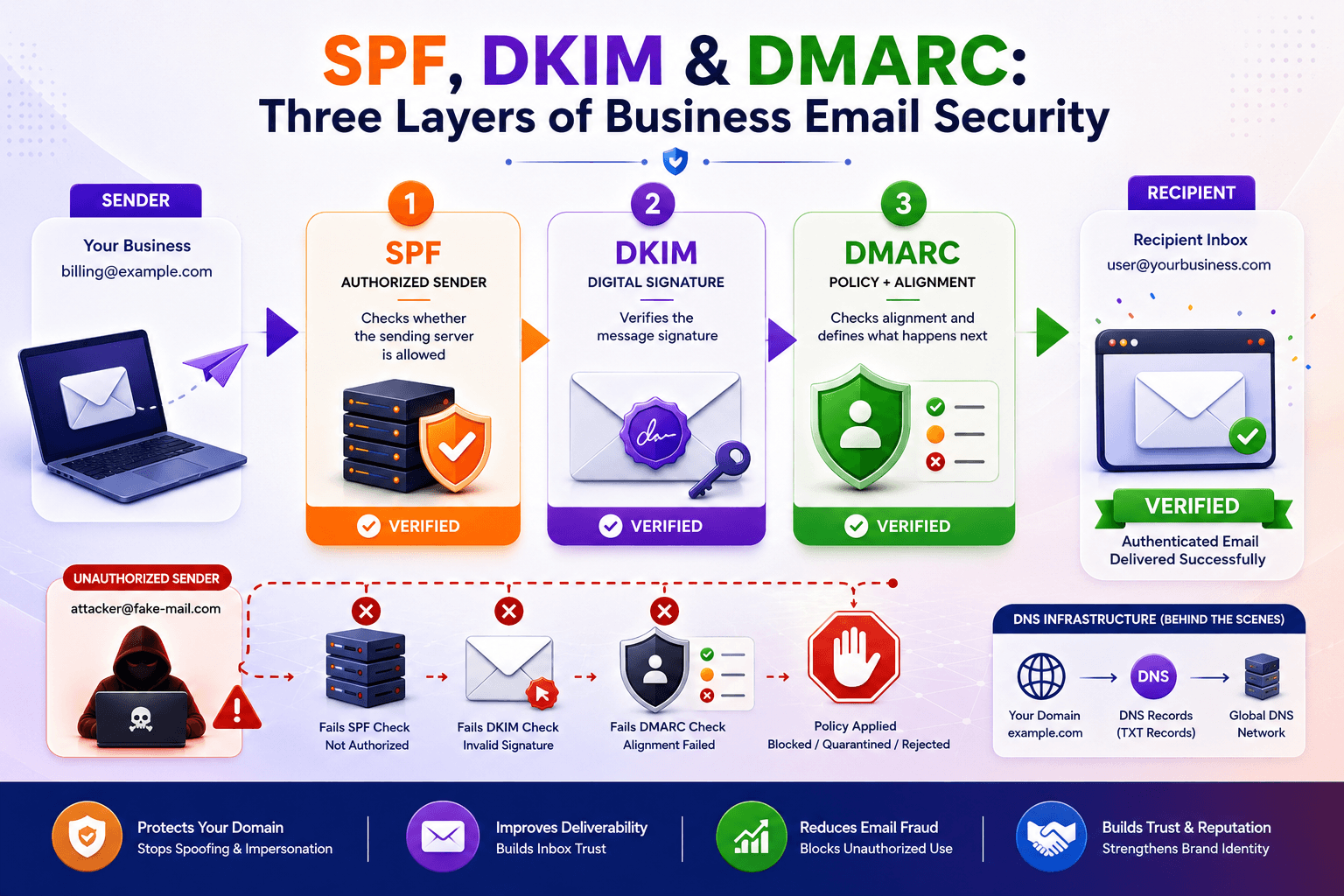
SPF DKIM DMARC are three important email authentication standards. Together, they help businesses protect their domains, reduce spoofing, and build trust in business email.
Every business relies on email for something important: customer communication, invoices, password resets, sales conversations, employee collaboration, marketing, and account notifications. But email was not originally designed with strong identity verification built in. Attackers can exploit that weakness by making fraudulent messages appear to come from a legitimate business domain.
This is where SPF, DKIM, and DMARC become important.
These three standards work together to help receiving email systems determine whether a message is authorized, whether its content has been cryptographically signed, and what should happen when authentication checks fail.
For businesses using their own domain for email, understanding these technologies is no longer just an IT concern. Proper email authentication can contribute to stronger domain protection, better email deliverability, and greater confidence in messages sent to customers and partners.
This guide explains SPF, DKIM and DMARC in practical terms, including what each standard does, how they work together, common configuration mistakes, and how businesses can build a stronger email security setup.
What Are SPF, DKIM and DMARC?
SPF, DKIM and DMARC are email authentication standards that help verify whether business emails are legitimate.
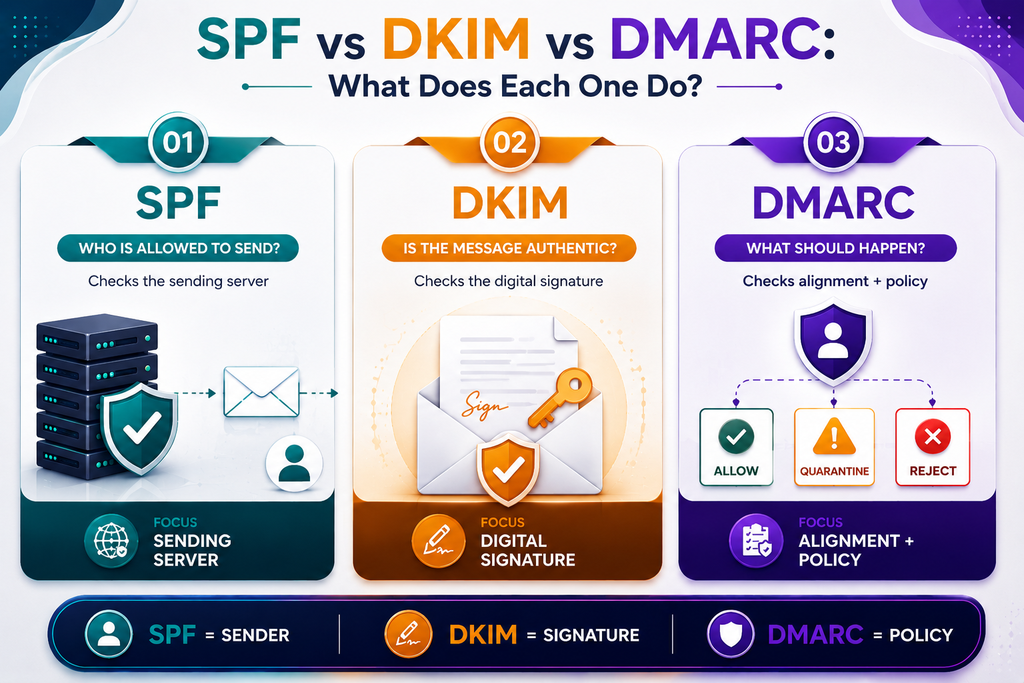
Each one solves a different part of the email security problem:
- SPF identifies which mail servers are authorized to send email for a domain.
- DKIM adds a cryptographic signature that helps verify that a message was authorized and has not been improperly modified.
- DMARC tells receiving mail systems how to handle messages that fail authentication and provides reporting capabilities.
A simple way to understand the relationship is:
SPF asks: “Is this server allowed to send email for this domain?”
DKIM asks: “Does this message contain a valid signature from the domain?”
DMARC asks: “What should happen if authentication fails, and does the authenticated identity align with the visible From address?”
Using all three provides a more complete approach than relying on only one.
Why Business Email Authentication Matters
Imagine a company called example.com.
An attacker could send a message that appears to come from:
The recipient may see the familiar company domain and assume the message is genuine.
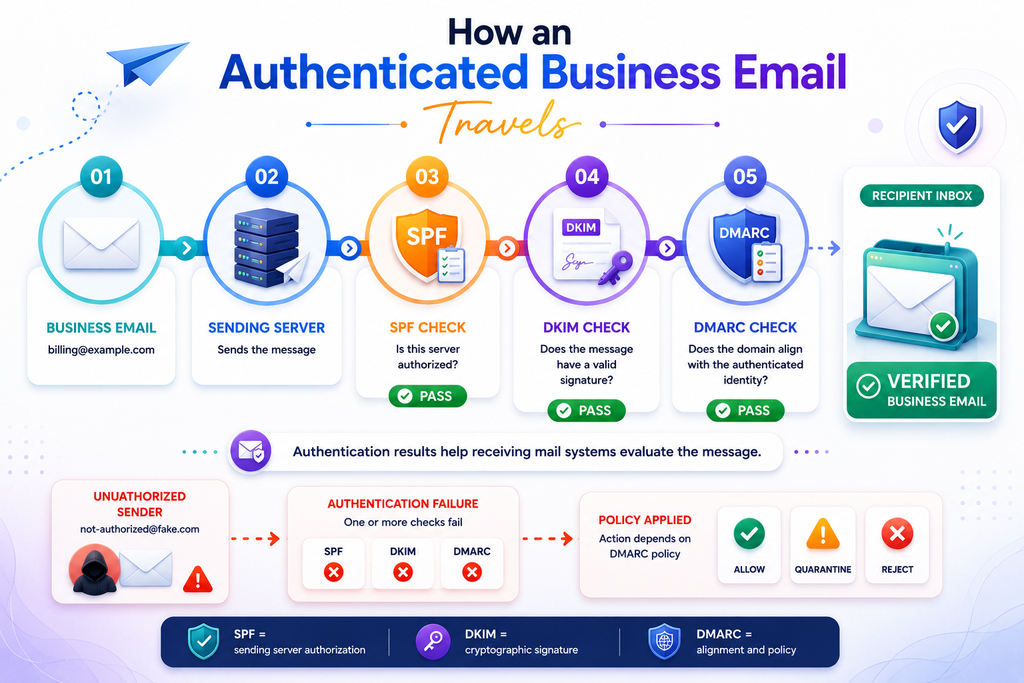
The attacker could then request:
- An urgent payment
- Sensitive documents
- Login credentials
- Customer information
- A password reset
- A bank account change
This type of impersonation is commonly associated with phishing and business email compromise.
Email authentication does not eliminate every type of phishing attack, but properly configured SPF, DKIM, and DMARC make it significantly harder for unauthorized systems to successfully impersonate a domain in ways that pass authentication checks.
For businesses managing their own digital infrastructure, email security should therefore be considered alongside website security, application security, access control, and data protection.
SPF Explained: Sender Policy Framework
SPF, or Sender Policy Framework, specifies which mail servers are authorized to send email on behalf of a domain.
Businesses publish SPF as a TXT record in DNS.
For example, a simplified SPF record might look like:
v=spf1 ip4:203.0.113.10 -allThis tells receiving systems that the specified IP address is authorized to send mail for the domain.
The -all portion indicates that other senders should be treated as unauthorized.
How SPF Works
When an email arrives, the receiving mail server can check the sending server’s IP address against the domain’s SPF record.
The process is roughly:
- A business sends an email.
- The receiving mail server identifies the sending IP address.
- It looks up the sender domain’s SPF record.
- The IP address is compared against the authorized senders.
- The receiving server records the SPF result.
If the sender is authorized, SPF can pass.
If the sender is not authorized, SPF can fail.
What SPF Does Well
SPF is useful for controlling which systems are permitted to send email using a domain.
This becomes particularly important when a business uses multiple email services, such as:
- Business email hosting
- Transactional email services
- Marketing platforms
- Customer support systems
- Application notification servers
All legitimate sending services need to be considered when creating the SPF policy.
Common SPF Mistake: Multiple SPF Records
A domain should not have multiple independent SPF records.
For example, publishing:
v=spf1 include:service-one.com -alland another:
v=spf1 include:service-two.com -allcan create an SPF configuration problem.
The authorized services generally need to be combined into a single SPF policy.
Businesses should also pay attention to SPF DNS lookup limitations. Large and complicated SPF configurations can become difficult to maintain and may exceed the permitted lookup limit.
DKIM Explained: DomainKeys Identified Mail
DKIM adds a digital signature to outgoing email so receiving systems can verify that the message was signed by an authorized domain and that signed portions of the message were not altered.
Unlike SPF, which primarily evaluates the sending server’s IP address, DKIM works through cryptographic signatures.
A typical DKIM system uses:
- A private key kept by the sending system
- A public key published in DNS
The sending mail server uses the private key to sign the message.
The receiving server retrieves the public key from DNS and uses it to verify the signature.
What Does a DKIM Record Look Like?
Your email system publishes the DKIM public key under a selector.
A simplified DNS location might look like:
selector1._domainkey.example.comThe corresponding TXT record contains the public key.
The exact record depends on the email hosting provider or mail server configuration.
Why DKIM Matters
DKIM helps establish that an email is associated with an authorized signing domain.
It can also help protect the integrity of signed message content while the message travels between mail systems.
For businesses, this is particularly useful when emails contain:
- Account notifications
- Password reset links
- Invoices
- Order confirmations
- Customer communications
- Important business correspondence
DKIM becomes even more valuable when combined with DMARC because DMARC can evaluate whether the authenticated DKIM domain aligns appropriately with the domain visible to the recipient.
DMARC Explained: Domain-Based Message Authentication
DMARC, or Domain-based Message Authentication, Reporting, and Conformance, builds on SPF and DKIM to help domain owners control how receiving systems handle unauthenticated messages.
Businesses also publish DMARC through DNS.
A basic DMARC record may look like:
v=DMARC1; p=none; rua=mailto:[email protected]The p value defines the domain owner’s requested policy.
Common policies include:
p=nonep=quarantinep=reject
What Does p=none Mean?
A p=none policy generally tells receiving systems to take no special enforcement action based on DMARC failure, while allowing reporting to be collected when configured.
This can be useful during the monitoring phase.
What Does p=quarantine Mean?
A quarantine policy asks receiving systems to treat messages that fail DMARC authentication according to a more suspicious or restricted handling policy, such as sending them toward spam or quarantine.
What Does p=reject Mean?
A reject policy requests that messages failing DMARC be rejected.
For organizations with a mature and correctly configured email environment, stronger enforcement can provide greater protection against unauthorized use of the domain.
However, moving directly to a strict policy without understanding legitimate sending sources can cause legitimate business emails to be rejected.
How SPF, DKIM and DMARC Work Together
SPF, DKIM and DMARC are most effective when treated as a system rather than three unrelated DNS records.
Consider this example:
A company sends an invoice from:
The receiving mail server can evaluate:
SPF:
Is the sending server authorized to send mail for the relevant domain?
DKIM:
Does the email contain a valid cryptographic signature?
DMARC:
Does the authenticated identity align with the domain used in the visible From address, and what should happen if authentication requirements are not satisfied?
This layered approach makes domain impersonation more difficult.
A Simple Comparison
| Standard | Main Purpose | Uses DNS? | Key Mechanism |
|---|---|---|---|
| SPF | Authorize sending servers | Yes | IP/server authorization |
| DKIM | Verify message signature | Yes | Public/private key cryptography |
| DMARC | Define authentication policy and reporting | Yes | SPF/DKIM alignment + policy |
The important point is that SPF and DKIM provide authentication signals, while DMARC adds alignment, policy, and reporting.
SPF vs DKIM vs DMARC: Which One Does Your Business Need?
Businesses should generally think of these standards as complementary rather than choosing only one.
SPF Without DKIM
SPF can identify whether the sending server is authorized, but it does not provide the same message-signing mechanism as DKIM.
DKIM Without SPF
DKIM provides cryptographic authentication, but SPF still offers a separate method for validating the sending infrastructure.
SPF and DKIM Without DMARC
The domain has authentication mechanisms, but it lacks DMARC’s domain-level policy and reporting framework.
SPF + DKIM + DMARC
Together, these provide a stronger foundation for business email authentication.
This is particularly important for organizations that use several systems to send messages from the same domain.
How to Set Up SPF, DKIM and DMARC
The exact DNS values depend on your email provider, domain configuration, and sending services, but the implementation process generally follows a structured approach.
Step 1: Identify Every Legitimate Email Sender
Before changing DNS, create a list of every service that sends email using your domain.
Include:
- Primary email hosting
- Website contact forms
- CRM platforms
- Marketing platforms
- Support systems
- Transactional email services
- Internal applications
- Cloud infrastructure
A forgotten application can become the reason legitimate messages fail authentication later.
Step 2: Configure SPF
Create or update the domain’s SPF TXT record to authorize legitimate sending infrastructure.
Avoid creating multiple SPF records.
Keep the record understandable and review it whenever your email infrastructure changes.
Step 3: Enable DKIM
Generate or obtain the DKIM public key from your email provider or mail server.
Publish the required DNS record.
Then verify that outgoing messages are being signed correctly.
Step 4: Start DMARC Monitoring
A business can begin with a monitoring-oriented DMARC policy such as:
v=DMARC1; p=none; rua=mailto:[email protected]This provides visibility into authentication activity while the organization identifies legitimate and unauthorized sources.
Step 5: Review DMARC Reports
Reports can help reveal:
- Legitimate email sources
- Unknown sending servers
- Misconfigured applications
- Authentication failures
- Potential unauthorized sending
Review the results before introducing stronger enforcement.
Step 6: Move Toward Enforcement
Once legitimate sending services are correctly authenticated, organizations can consider moving from monitoring toward quarantine or rejection.
The transition should be deliberate rather than rushed.
Common SPF, DKIM and DMARC Mistakes
Even when a business has created the required DNS records, configuration problems can remain.
1. Creating Multiple SPF Records
This is one of the most common configuration errors.
Combine authorized senders into the appropriate SPF policy instead of publishing multiple SPF TXT records.
2. Forgetting a Third-Party Sender
A company may correctly configure its main email provider but forget that its CRM or website also sends emails.
The result can be unexpected authentication failures.
3. Publishing the Wrong DKIM Key
A typo, incorrect selector, or outdated public key can cause DKIM verification to fail.
4. Enforcing DMARC Too Quickly
Moving directly to p=reject without monitoring legitimate traffic can result in genuine business emails being rejected.
5. Ignoring Domain Alignment
Passing SPF or DKIM alone does not automatically mean DMARC will pass. DMARC also considers alignment between authenticated domains and the visible From domain.
6. Never Reviewing Reports
DMARC reporting is valuable only if someone actually reviews the information and acts on unexpected sources.
Business Email Security Is More Than DNS
SPF, DKIM and DMARC address important parts of email authentication, but they are not a complete cybersecurity strategy.
Businesses should also consider:
- Strong account passwords
- Multi-factor authentication
- Secure administrative access
- Employee phishing awareness
- Regular software updates
- Endpoint protection
- Access controls
- Backup and recovery procedures
- Secure website forms
- Application security
- Domain and DNS management
Email security also connects with the broader technology infrastructure supporting a business.
For organizations developing websites, web applications, customer portals, or other digital products, secure infrastructure should be considered alongside performance, usability, and technical architecture.
Technobot System works across business technology and digital solutions, where secure and reliable infrastructure can be an important part of delivering dependable digital experiences.
How Email Hosting Fits Into the Bigger Picture
Email authentication is only one part of running a reliable business email environment.
Organizations also need to think about:
- Mailbox management
- Domain configuration
- SMTP
- IMAP
- Spam filtering
- Email storage
- DNS records
- Account security
- Deliverability
- Monitoring
For businesses evaluating email hosting infrastructure, BulkMX is one relevant example to consider when planning business email infrastructure.
The important principle is to understand how the mail service, DNS configuration, authentication records, and sending applications fit together instead of treating each component as an isolated setting.
How to Check Whether Your Domain Is Properly Configured
You do not have to wait until customers report missing emails to investigate your configuration.
A basic review should check whether:
- Your domain has a valid SPF record
- There is only one SPF policy
- DKIM is enabled for your sending systems
- DKIM signatures are actually being generated
- A DMARC record exists
- The DMARC policy reflects your current security maturity
- Legitimate third-party senders are authenticated
- Unexpected sending sources appear in DMARC reports
- DNS changes have propagated correctly
You can also inspect email headers from received messages to understand authentication results.
Look for fields such as:
Authentication-Results:
spf=pass
dkim=pass
dmarc=pass
The exact format varies by mail provider, but these results can provide useful clues when troubleshooting.
What Should a Small Business Do First?
If your business has never configured email authentication, avoid trying to change everything at once.
A practical sequence is:
1. Inventory your email senders
Find every platform that sends messages using your domain.
2. Configure SPF
Authorize the legitimate sending infrastructure.
3. Configure DKIM
Enable message signing wherever supported.
4. Add DMARC
Start with monitoring if your sending environment is not fully understood.
5. Review authentication data
Look for legitimate and unexpected sources.
6. Correct configuration problems
Fix services that are sending without proper authentication.
7. Strengthen DMARC enforcement
Once legitimate sources are understood and configured, consider a stronger policy.
This staged approach reduces the risk of disrupting legitimate business communication.
Frequently Asked Questions
Is SPF enough to protect business email?
No. SPF is useful for identifying authorized sending servers, but it is only one component of email authentication. DKIM and DMARC provide additional protection and policy capabilities.
Is DKIM better than SPF?
Neither is simply “better.” They solve different problems. SPF validates the sending infrastructure, while DKIM uses cryptographic signatures to authenticate messages. Using both provides broader coverage.
What does DMARC do that SPF and DKIM do not?
DMARC adds alignment requirements, domain-level policy, and reporting. It allows domain owners to communicate how receiving systems should handle messages that do not satisfy DMARC authentication requirements.
Can DMARC stop phishing completely?
No. DMARC primarily helps protect the use of your domain in email authentication scenarios. Attackers can still use lookalike domains, compromised accounts, or other techniques.
Should every business use DMARC?
Businesses using their own domain for email should strongly consider implementing DMARC as part of a broader email security strategy, particularly when protecting a recognizable company domain is important.
Does changing DNS records immediately fix email security?
Not necessarily. DNS changes need to propagate, and the underlying email services must also be configured correctly. Authentication should be tested after implementation.
Final Thoughts: SPF, DKIM and DMARC Should Work as a System
SPF, DKIM and DMARC form an important foundation for business email security.
SPF helps identify authorized sending infrastructure. DKIM adds cryptographic message authentication. DMARC brings these mechanisms together with domain alignment, policy enforcement, and reporting.
The biggest mistake businesses can make is treating email authentication as a one-time DNS task.
Email infrastructure changes. Businesses add new software, switch providers, introduce CRM systems, launch applications, and add transactional email services. Every change can affect authentication and deliverability.
A better approach is to treat SPF, DKIM and DMARC as part of ongoing technical maintenance.
Start by identifying legitimate senders, configure SPF and DKIM correctly, introduce DMARC monitoring, review authentication results, and gradually strengthen enforcement.
For businesses building secure digital operations, email authentication should sit alongside broader website, application, infrastructure, and data-protection practices. A properly configured domain does more than improve technical reliability—it helps establish a stronger foundation for trusted business communication.
Tags
Share this article
About the Author
Experienced IT professional specializing in enterprise solutions and modern technology implementations.
Related Articles


Stay Updated
Get the latest IT insights delivered to your inbox.