
Cloud Migration Made Simple: A Step-by-Step Guide for Modern Businesses
“The cloud is not just technology — it is a business transformation strategy.” ☁️
In today’s digital-first economy, organizations are rapidly moving their workloads, applications, and infrastructure to the cloud. However, despite its popularity, cloud migration still feels complex, risky, and expensive to many businesses.
Therefore, this comprehensive guide simplifies cloud migration into a structured, step-by-step framework that ensures security, scalability, cost-efficiency, and long-term growth.
If implemented correctly, cloud migration can reduce operational costs by up to 40%, increase deployment speed, and improve system reliability.
Let’s break it down.
What is Cloud Migration?
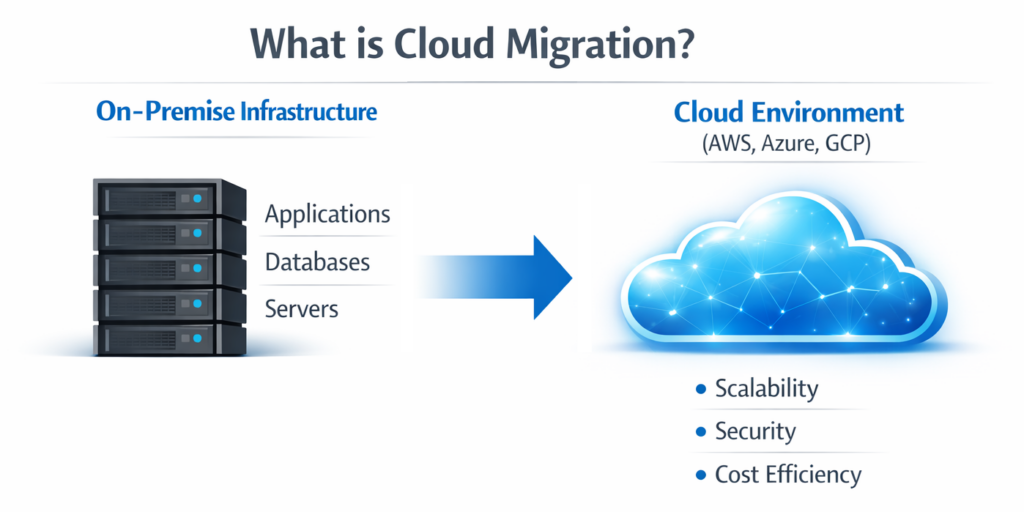
Cloud migration is the process of moving digital assets — including applications, databases, servers, and workloads — from on-premise infrastructure to cloud environments such as:
- Amazon Web Services (AWS)
- Microsoft Azure
- Google Cloud Platform (GCP)
Additionally, businesses may migrate between cloud providers or move from private cloud to hybrid/multi-cloud environments.
👉 According to Gartner, over 85% of organizations will adopt a cloud-first strategy by 2027.
Why Businesses Are Moving to the Cloud
1️⃣ Cost Efficiency
Firstly, cloud platforms eliminate heavy capital expenses like physical servers, hardware maintenance, and cooling systems.
2️⃣ Scalability
Secondly, businesses can scale resources up or down instantly based on demand.
3️⃣ Business Continuity
Moreover, cloud providers offer built-in disaster recovery and redundancy.
4️⃣ Security & Compliance
Leading cloud providers offer enterprise-grade encryption and compliance frameworks.
🔗 “Why Investing in IT Infrastructure Is No Longer Optional”
Types of Cloud Migration Strategies (The 6 Rs Model)
Understanding the right approach is crucial.
1. Rehosting (Lift and Shift)
Move applications without major changes.
2. Replatforming
Make minor optimizations before moving.
3. Refactoring
Redesign apps for cloud-native benefits.
4. Retaining
Keep certain applications on-premise.
5. Retiring
Eliminate outdated applications.
6. Repurchasing
Move to SaaS solutions.
Each strategy depends on business goals, budget, and technical complexity.
Step-by-Step Cloud Migration Guide
Step 1: Assess Your Current Infrastructure
Before migrating, conduct a detailed IT audit:
- Server inventory
- Application dependencies
- Data classification
- Compliance requirements
- Performance benchmarks
Furthermore, use tools like:
- AWS Migration Evaluator
- Azure Migrate
- Google Cloud Migration Center
🔗 https://aws.amazon.com/cloud-migration/
Step 2: Define Clear Migration Goals
Ask yourself:
- Are you reducing cost?
- Improving scalability?
- Enhancing security?
- Supporting remote workforce?
Without clear KPIs, migration may fail.
Step 3: Choose the Right Cloud Model
Public Cloud
Cost-effective & scalable.
Private Cloud
High security & customization.
Hybrid Cloud
Balance between both.
Step 4: Create a Cloud Migration Roadmap
Your roadmap should include:
- Timeline
- Budget
- Resource allocation
- Risk assessment
- Backup strategy
Additionally, define fallback procedures.
Step 5: Strengthen Security & Compliance
Security must not be an afterthought.
Implement:
- Data encryption (at rest & in transit)
- Identity & Access Management (IAM)
- Multi-Factor Authentication
- Zero Trust Architecture
🔗 https://cloud.google.com/security
Step 6: Migrate Data & Applications
Use phased migration:
- Pilot testing
- Batch migration
- Continuous monitoring
- Performance validation
Avoid migrating everything at once.
Step 7: Test, Optimize & Monitor
After migration:
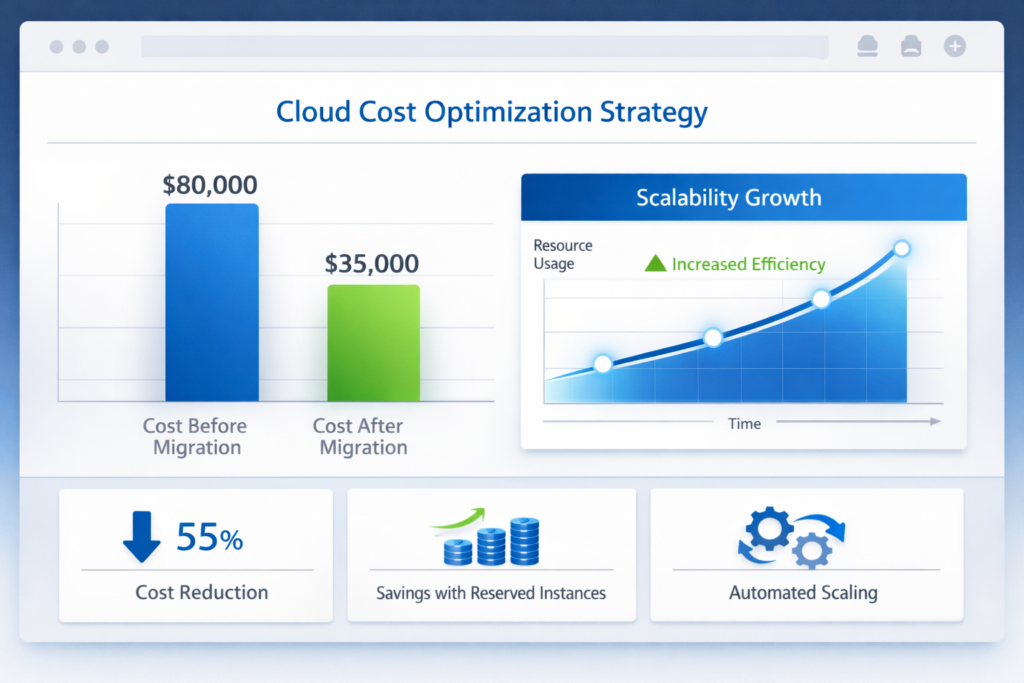
- Monitor CPU usage
- Track latency
- Optimize storage
- Implement auto-scaling
Tools:
- AWS CloudWatch
- Azure Monitor
- Google Operations Suite
Common Cloud Migration Challenges
Even though cloud migration offers benefits, it presents challenges:
- Data loss risk
- Downtime
- Unexpected cost spikes
- Vendor lock-in
- Skill gaps
Therefore, expert planning is critical.
Cloud Migration Cost Optimization Tips
- Right-size resources
- Use reserved instances
- Automate shutdown of unused resources
- Monitor usage monthly
- Use cost analytics dashboards
Cloud Security Best Practices
- Implement Zero Trust Architecture
- Enable centralized logging
- Regular penetration testing
- Compliance auditing
🔗“Vital Role of Cybersecurity in Web Application Development”
Cloud Migration & Business Growth
Cloud adoption improves:
- Deployment speed by 70%
- Infrastructure reliability
- Global accessibility
- DevOps collaboration
Consequently, companies innovate faster.
Real-World Use Case Example
A mid-sized enterprise migrated 120+ servers to AWS:
- Reduced infrastructure cost by 35%
- Improved application performance by 50%
- Reduced downtime by 60%
This demonstrates how strategic cloud migration delivers measurable ROI.
Advanced Best Practices (Rare & Powerful)
- Adopt Infrastructure as Code (IaC)
- Implement Cloud Governance Framework
- Enable FinOps Culture
- Use Multi-Cloud Risk Distribution
- Conduct Quarterly Cloud Audits
How Technobot System Can Help
At Technobot System, we help businesses:
- Design secure cloud architecture
- Plan phased migration strategy
- Implement DevOps pipelines
- Optimize cloud cost
- Ensure regulatory compliance
👉 Learn more: https://technobotsystem.com/
FAQ Section (For Rich Snippets)
What is cloud migration?
Cloud migration is the process of moving IT infrastructure, applications, and data to cloud platforms like AWS, Azure, or GCP.
How long does cloud migration take?
It depends on infrastructure size; typically 3–9 months.
Is cloud migration secure?
Yes, if implemented with proper encryption, IAM policies, and compliance frameworks.
Conclusion
In conclusion, cloud migration is not merely an IT upgrade — it is a strategic transformation initiative.
When planned carefully, executed in phases, and optimized continuously, it delivers unmatched scalability, resilience, and innovation capacity.
Therefore, businesses that adopt cloud today position themselves for tomorrow’s digital economy.
Tags
Share this article
About the Author
Experienced IT professional specializing in enterprise solutions and modern technology implementations.
Related Articles
Stay Updated
Get the latest IT insights delivered to your inbox.